Utility Bill OCR API
The following document highlights the details of the Utility Bill OCR API.
API Description
Objective
The Utility Bill OCR API extracts the textual data from an image or document of a Utility Bill and returns it in a JSON format. The data fields extracted are as follows:
- Customer Name
- Customer Number
- Customer Address
- Bill Type
- Bill Provider
- Bill Amount
- Document Date (Billing/invoice Date)
| Input | Output |
|---|---|
| An image or PDF file containing the utility bill | The textual information extracted from the document and converted into a JSON format. The complete list of output fields is provided under the Success Response Details section. |
API URL
https://ind-engine.thomas.hyperverge.co/v1/readINDUtilityBill
API Endpoint
readINDUtilityBill
Overview
The Utility Bill OCR API is RESTful and uses standard HTTP verbs and status codes. The responses are in JSON format and you should upload all images and files as form-data through a POST request.
Method - POST
Authentication
You need a unique pair of application ID ( appId ) and application key ( appKey ) from HyperVerge to verify your identity for accessing the Utility Bill OCR API.
Headers
| Header | Mandatory / Optional | Description | Input Format |
|---|---|---|---|
| content-type | Mandatory | This parameter defines the media type for the request payload | multipart/form-data |
| appId | Mandatory | The application identifier shared by HyperVerge. You can find the details in the dashboard's credentials tab | This should be a unique value |
| appKey | Mandatory | The application key shared by HyperVerge. You can find the details in the dashboard's credentials tab | This should be a unique value |
| transactionId | Mandatory | Unique ID for the customer journey | Any defined unique value mapped to a transaction in your business ecosystem |
Inputs
The following table provides the details of the parameters required for the Utility Bill OCR API's request body:
| Parameter | Mandatory / Optional | Type | Description | Input Format | Default Value |
|---|---|---|---|---|---|
image | Mandatory | file | The image file for OCR extraction | Image file (JPEG, JPG, PNG) or PDF | Not Applicable |
- If you send multiple files in the same API request, the OCR extraction will be performed only on one of the files. Kindly send only one file in a request to avoid confusion.
- If the PDF file has multiple pages, only the first page will be considered for the OCR extraction.
Request
The following code snippet demonstrates a standard curl request for the Utility Bill OCR API:
curl --location --request POST 'https://ind-engine.thomas.hyperverge.co/v1/readINDUtilityBill' \
--header 'appid: <Enter_the_appId-Shared-by-HyperVerge>' \
--header 'appkey: <Enter_the_appKey-shared-by-HyperVerge>' \
--header 'transactionId : <Enter_the_Transaction_ID>' \
--form 'image=@"<path_to_image_file>"'
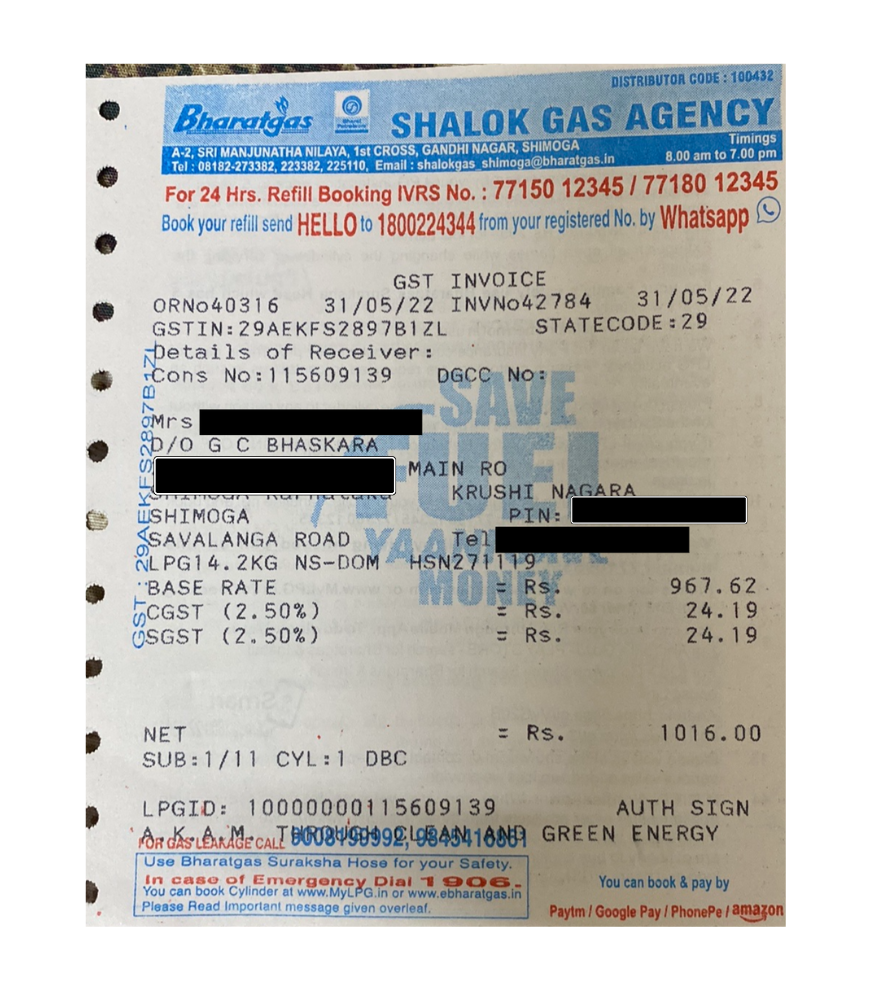
Document Sample
The following is a Utility Bill:
Success Response
The following code snippet demonstrates a success response from the Utility Bill OCR API:
{
    "status": "success",
    "statusCode": 200,
    "result": {
        "details": [
            {
                "fieldsExtracted": {
                    "customerName": {
                        "value": "<NAME>"
                    },
                    "customerPhoneNumber": {
                        "value": "<Customer_Phone_Number>"
                    },
                    "billType": {
                        "value": "<Bill_Type>"
                    },
                    "documentDate": {
                        "value": "Document_Date_in_DD/MM/YYYY_Format>"
                    },
                    "billProvider": {
                        "value": "<Bill_Provider_Name>"
                    },
                    "billAmount": {
                        "value": "<Bill_Amount>"
                    },
                    "customerAddress": {
                        "value": "<ADDRESS>"
                    }
                },
                "type": "Utility Bill"
            }
        ]
    },
    "metadata": {
        "requestId": "<Request_ID>",
        "transactionId": "<Transaction_ID>"
    }
}
Success Response Details
The following table outlines the details of the success response from the Utility Bill OCR API:
| Parameter | Type | Description |
|---|---|---|
status | string | The status of the request |
statusCode | integer | The HTTP status code returned for the request |
result | object | Contains the extracted details from the utility bill |
details | array | Contains the extracted fields with their values and confidence scores |
fieldsExtracted | object | Contains all the extracted utility bill fields and their values |
customerName | object | Customer name extracted from the utility bill |
customerName.value | string | The actual customer name value |
customerPhoneNumber | object | Customer phone number extracted from the utility bill |
customerPhoneNumber.value | string | The actual customer phone number value |
billType | object | Type of utility bill extracted from the document |
billType.value | string | The actual bill type value (e.g., Broadband bill) |
documentDate | object | Document date or billing date extracted from the utility bill |
documentDate.value | string | The actual document date value |
billProvider | object | Name of the utility service provider extracted from the bill |
billProvider.value | string | The actual bill provider name value |
billAmount | object | Total bill amount extracted from the utility bill |
billAmount.value | string | The actual bill amount value |
customerAddress | object | Customer address extracted from the utility bill |
customerAddress.value | string | The actual customer address value |
type | string | The type of document processed (e.g., Utility Bill) |
metadata | object | Contains request and transaction identifiers |
requestId | string | A unique identifier for the request |
transactionId | string | A unique identifier for the transaction |
Failure Response
The following code snippet demonstrates a failure response from the Utility Bill OCR API:
{
  "status": "failure",
  "statusCode": 400,
  "error": "API call requires one input image"
}
Error Responses
The following are some error responses from the Utility Bill OCR API:
- No Image Input
- Image Size Exceeds Limit of 6MB
- Document Not Detected
{
    "status": "failure",
    "statusCode": 400,
    "error": "API call requires one input image"
}
{
    "status": "failure",
    "statusCode": 400,
    "error": "Image size cannot be greater than 6MB"
}
{
  "status": "failure",
  "statusCode": 422,
  "error": "Document Not Detected"
}
Error Response Details
A failure or error response contains a failure status with a relevant status code and error message.
The following table lists all error responses:
| Status Code | Error Message | Error Description | Error Resolution |
|---|---|---|---|
| 400 | API call requires one input image | The request does not include an input image, which is mandatory for processing. | Ensure the request includes the image parameter with a valid image or PDF file |
| 400 | Image size cannot be greater than 6MB | The provided image exceeds the maximum allowed size of 6MB. | Reduce the image file size to 6MB or less before submitting the request |
| 422 | Document Not Detected | The system was unable to detect any document in the provided image. | Ensure the image contains a clear and visible utility bill document, or contact the HyperVerge team if the issue persists |